| .. | ||
| docs | ||
| .terraform.lock.hcl | ||
| 010-provider.tf | ||
| 020-variables.tf | ||
| 030-stackit-stackit-vpn.tf | ||
| MAINTAINERS.md | ||
| README.md | ||

STACKIT-to-STACKIT VPN Gateway
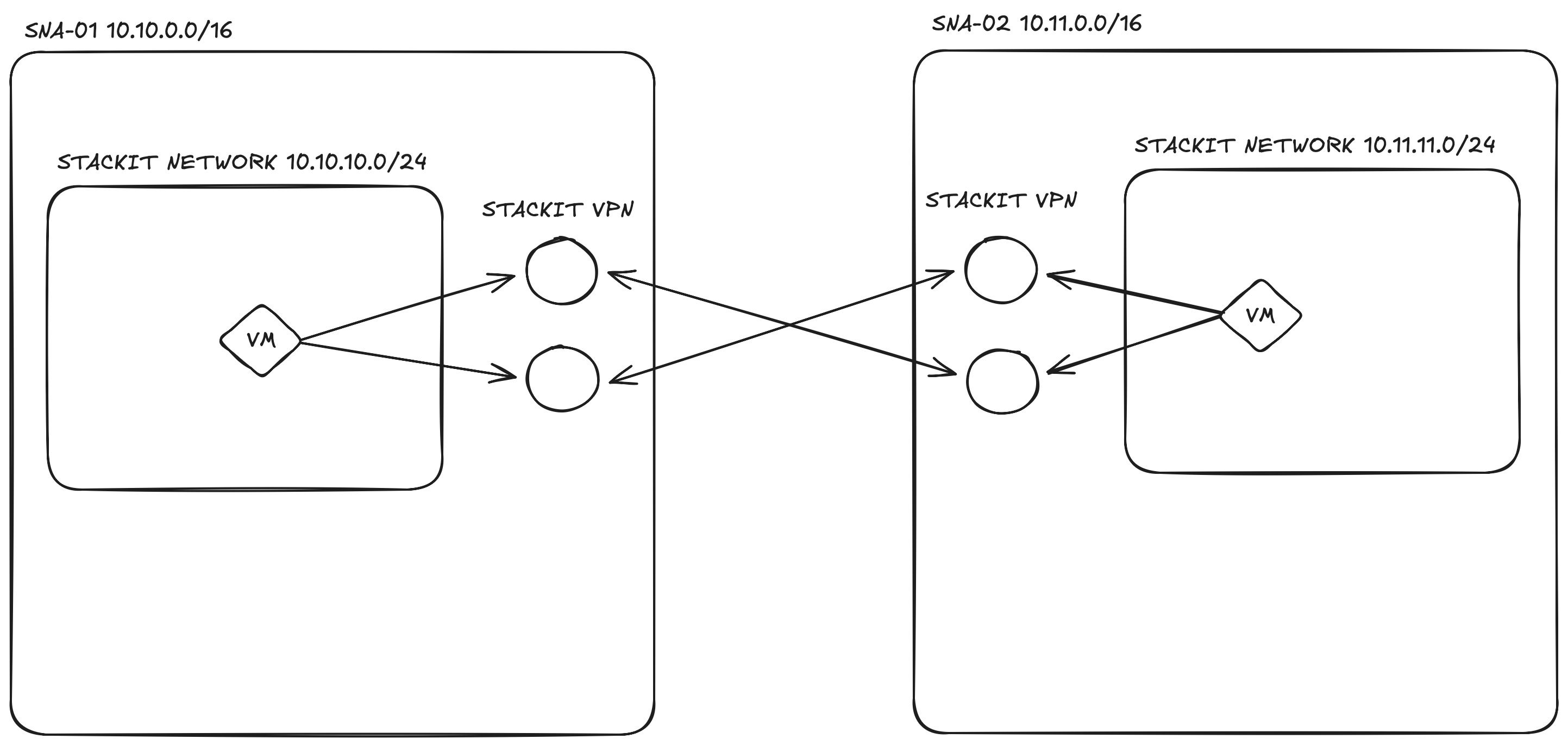
This example leverages the STACKIT VPN service to establish a secure, Highly Available (HA) connection between two separate STACKIT Network Areas (SNAs).
The connection utilizes BGP (Border Gateway Protocol) to automatically propagate and learn routing information between the two networks.
Note: Currently, native SNA peering is not available in STACKIT. Therefore, provisioning a VPN connection is the required method to interconnect two SNAs. This will change in the future once native SNA peering is released.
How to Test the Connection
Once the deployment is complete, you can verify the VPN tunnel using the provisioned debug machines:
- SSH into the first debug machine using its public IP (
vpn01_public_ip). - Ping the private IP of the second debug machine (
vpn02_private_ip) across the tunnel.
# Example test command once connected to the vpn01 machine via SSH
ping <vpn02_private_ip>